


The advertising regulator says it will again scan Black Friday ads for savings that cannot be backed up. You can run a simple version of that check yourself in two minutes.
CTRL + ALT News | Gadgets | Information checked on 24 November 2026
Black Friday falls on 27 November. The Advertising Standards Authority (ASA) says it will use its AI-powered monitoring system to capture online ads with price promotions and savings claims in and around the day, and take action where needed. Last year the same approach led it to ban ads from John Lewis, Debenhams and Boots, because none could provide evidence that the advertised savings were genuine reductions against the usual selling price.
That test, a real reduction against a real usual price, is also the one that matters to you. This guide explains what the regulators have said, gives you a short calculation to check a deal yourself, and covers your right to cancel and where to complain. It names no deals and carries no affiliate links.
What the ASA says it will check this year
According to the ASA’s own article (published on its site on 18 November 2026 and first in Retail Gazette on 17 November), its approach this year is the same as last: capture promotional ads at scale, have its experts review the savings claims, and investigate. When it investigates a pricing claim, advertisers must substantiate the savings: provide evidence of their pricing history, show that the reference price is genuine and that the advertised discount is a real saving. The ASA adds that no retailer is above scrutiny, whatever its size.
Two things follow for you. A “was” price is only meaningful if the product was really sold at that price. And a seller that cannot show the history is the kind of advertiser the ASA has banned.
A two-minute check you can do yourself
This is our own method, not a legal test. It compares the Black Friday price with the price the product usually sold at, not with the “was” price in the advert.
- Find the price history for the product over the previous four to eight weeks. Use a price-tracking site, or your own dated screenshots if you saw the product earlier. We do not recommend any particular site.
- Find the usual price: the price it sat at in most of those weeks.
- Work out the real change: (sale price − usual price) ÷ usual price. A negative number is a real saving, and its size is your real discount.

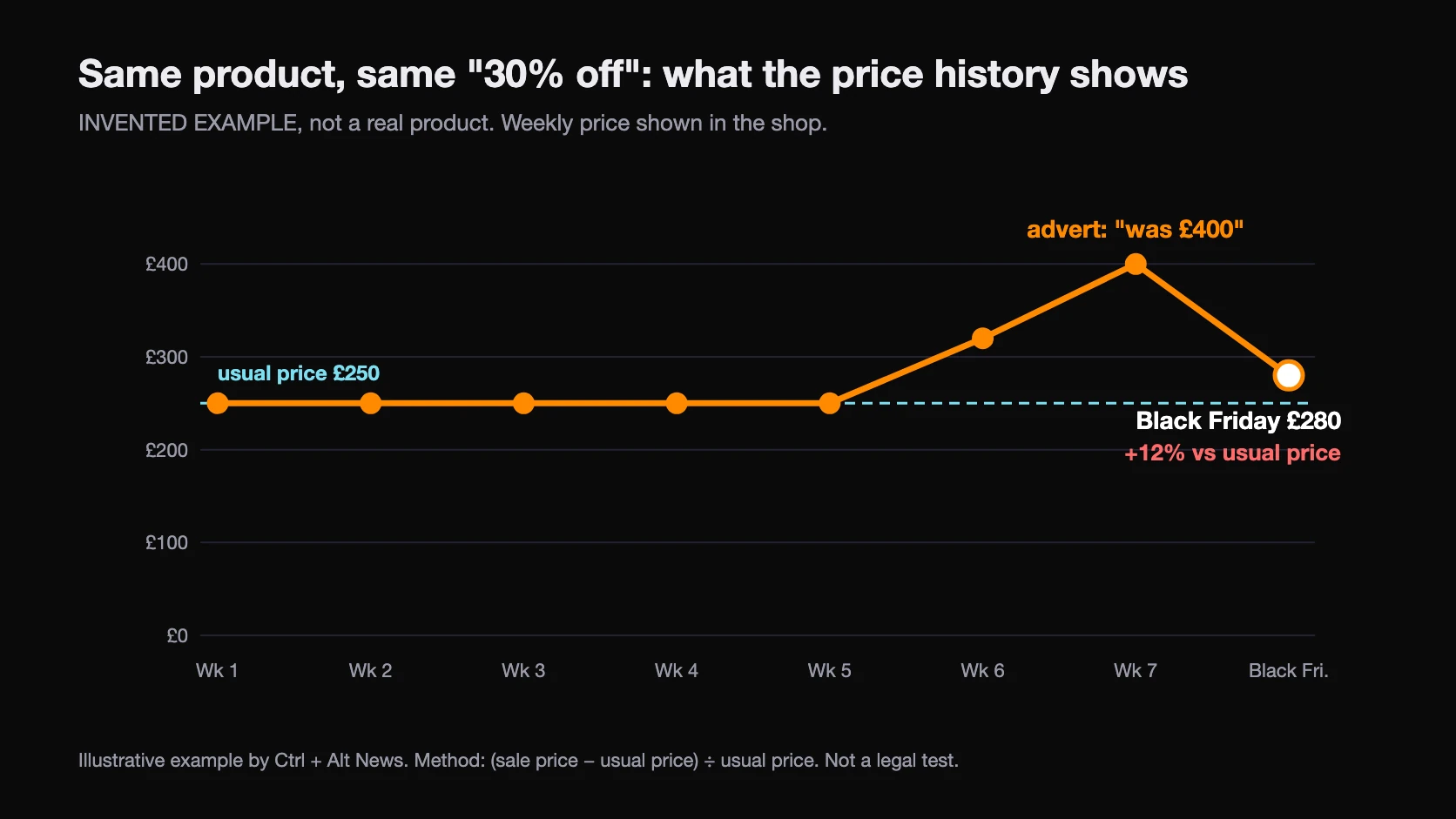
An invented example, not a real product:
| When | Price shown |
|---|---|
| Weeks 1 to 5 | £250 |
| Week 6 | £320 |
| Week 7 | £400 |
| Black Friday | £280, advertised as “was £400, 30% off” |
The advert’s saving is (400 − 280) ÷ 400 = 30%. Against the usual price the change is (280 − 250) ÷ 250 = +12%: the “deal” costs £30 more than the product normally did. Against week 6 it would look like a 12.5% cut, so the answer depends on which price you compare with. That is why the history matters.
The headline price is not always the price you pay
The CMA’s price transparency guidance, published on 18 November 2025 and updated on 7 January 2026, explains how traders must show prices clearly. According to the GOV.UK page, it covers what to include in the price (including mandatory fees, taxes and charges), drip pricing (adding charges as you move through the purchase) and partitioned pricing (showing the parts of a price but not the total you will pay). When you compare deals, compare the total at the final checkout step, not the figure on the product page.
After you buy: the 14-day right to cancel
For most things bought online, by phone or by mail order, the Consumer Contracts Regulations 2013 give you a cancellation period. For goods, under regulation 30, it ends 14 days after the goods come into your physical possession (or that of someone you name). For services and digital content that is not supplied on a physical medium, it ends 14 days after the contract is made. Which? adds that some orders cannot be cancelled, including bespoke or personalised items and goods likely to deteriorate rapidly.

If a deal looks misleading
- A misleading advert: the ASA takes complaints from anyone who thinks something is wrong with an ad it has seen or heard, through an online form.
- A problem with a purchase: GOV.UK lists a helpline for consumer advice that can also refer complaints to Trading Standards. In England and Wales it points to Citizens Advice, in Scotland to Advice Direct Scotland and in Northern Ireland to Consumerline.
A seven-step checklist
- Look up the price history; the ASA expects sellers to have one.
- Work out the real change against the usual price (our method above).
- Check the total price at checkout, including mandatory fees (CMA).
- Take a dated screenshot of the offer and the checkout (our suggestion).
- Note when your 14-day period starts (Consumer Contracts Regulations; Which?).
- Check whether the item is one of the exceptions to cancelling (Which?).
- Know where to complain: the ASA for ads, the GOV.UK helpline for purchases.
For another example of checking a price against the official one, see how we report UK launch prices, as with the iPad mini.
What this guide does not cover
This is not legal advice. We did not read the CMA’s full 58-page guidance, which deals with fees and charges and not with “was” prices. We also left out reports of CMA fines and court rulings on “was” prices: the law-firm summaries we found disagreed on dates and amounts, and we could not confirm them on official pages. The rights described here can differ for some products and sellers, so check the regulation or GOV.UK page before relying on them.
Sources: ASA, “The real deal: Black Friday back under the ASA’s microscope”, 18 November 2026; CMA, “Price transparency” (CMA209), GOV.UK; Consumer Contracts Regulations 2013, regulation 30; GOV.UK, “Consumer rights”; ASA, “Make a complaint”; Which?, “Can I cancel an online order?”.




Leave a Reply